 By Saurav Mehra
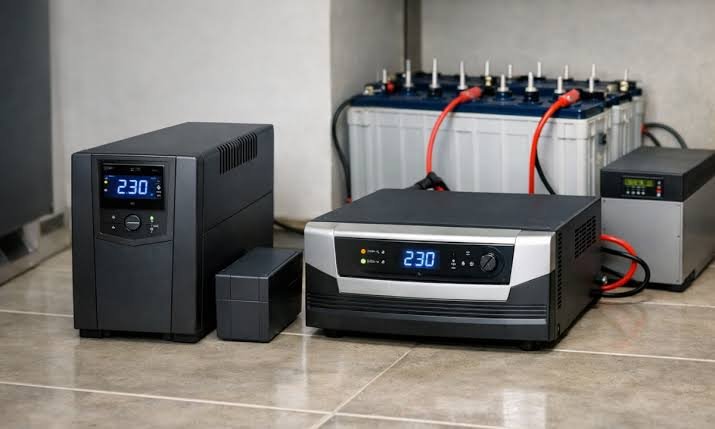
Power cuts remain part of daily life in many Indian cities and towns, from brief evening trips during summer peaks to longer outages after monsoon storms, and the two common ways to keep things running are a home inverter or a UPS. An inverter, paired with a large battery, keeps fans, lights, the Wi-Fi router and the TV running for hours. A UPS switches over almost instantly to protect computers and sensitive electronics, but usually lasts only a few minutes. They’re built for different jobs, and understanding that difference helps you protect both your comfort and your devices.
What Each Device Is Built For
A home inverter converts DC power stored in a large battery into AC power for your home’s circuits when the mains supply fails. It’s typically wired into selected circuits so that fans, lights, the router and a TV continue working. When power returns, it recharges the battery.
A UPS, or uninterruptible power supply, is designed mainly for computers and electronics. It contains a small battery and switches to it extremely quickly when power fails. Its purpose is to keep a desktop computer, CCTV recorder or network equipment running long enough to save work or ride through a short outage.
In short, inverters are built for long backup, and UPS units are built for fast switchover.
Switchover Time: Why Computers Care
When power fails, there’s a tiny gap before backup takes over.
- Standard UPS units switch over in a few milliseconds, fast enough that a desktop computer doesn’t notice.
- Online UPS units have zero transfer time, since equipment always runs from the battery circuit.
- Home inverters typically switch over in roughly 10 to 20 milliseconds, depending on the model and mode.
A desktop computer may restart during a slower switchover, losing unsaved work. Laptops, phones and fans don’t mind, since they have their own batteries or simply keep spinning.
Many home inverters include a “UPS mode” that speeds up switchover, at the cost of a narrower input voltage range. If you run a desktop on inverter power, switch to UPS mode. Use normal mode in areas with large voltage fluctuations, so the inverter doesn’t switch to battery unnecessarily.
Backup Time, Worked Out
Here’s how to estimate how long an inverter will last.
A 150 Ah, 12 V battery stores about 1,800 watt-hours. Lead-acid batteries last longer when not fully drained, so you might use about 60 percent of that. With inverter efficiency of around 85 percent, usable energy comes to roughly 920 watt-hours.
Now consider typical evening loads:
- 3 BLDC fans at 30 W, 6 LED lights at 9 W and a router at 10 W: about 154 W, giving around 6 hours
- The same plus a TV at 80 W: about 234 W, giving around 4 hours
- 3 induction fans at 70 W instead of BLDC, plus lights and router: about 274 W, giving around 3.4 hours
Switching to BLDC fans and LED lights can nearly double backup time without buying a larger battery.
By comparison, a typical 600 VA computer UPS with a small 7 Ah battery stores only about 84 watt-hours. Running a 150 W desktop setup, it may last around 10 minutes in practice, which is enough to save work and shut down safely.
Sizing an Inverter for Your Home
Inverters are rated in VA (volt-amperes). To estimate the VA you need, divide your total load in watts by a power factor of roughly 0.7 to 0.8.
For the 274 W load above, that’s about 340 to 390 VA. An inverter of around 700 to 900 VA gives comfortable headroom, especially since appliances like fans draw extra current briefly when starting.
Heavier loads, such as a refrigerator, a water pump or multiple TVs, need a larger inverter and battery bank, often 1,500 VA or more with two batteries.
Sine Wave Output and Sensitive Appliances
Inverters produce either a pure sine wave or a modified (square) wave output.
Pure sine wave inverters supply power similar to the mains, which suits:
- BLDC fans and inverter-type appliances
- Refrigerators and their compressors
- Computers, TVs and audio equipment
- Medical devices used at home
Square wave inverters are cheaper but can make fans hum, heat up some appliances and affect sensitive electronics. For most homes today, a pure sine wave inverter is the safer choice.
Batteries: Tubular, SMF and Lithium
Home inverters typically use:
- Tubular lead-acid batteries: durable and widely used, lasting around 4 to 6 years with care. They need distilled water topped up every few months.
- Flat-plate lead-acid batteries: cheaper but shorter-lived.
- Lithium (LiFePO4) batteries: maintenance-free, lighter, faster charging and longer-lasting, though more expensive upfront.
UPS units usually use small sealed maintenance-free (SMF) batteries that last around 2 to 4 years and need replacement when backup time drops noticeably.
Where a UPS Makes More Sense
A UPS is the better choice for:
- Desktop computers: protects against sudden shutdowns and data loss.
- Work-from-home setups: a small mini UPS for the Wi-Fi router and fibre modem keeps internet running during short cuts.
- CCTV recorders: prevents recording gaps and protects hard disks.
- Gaming consoles and network storage: avoids corruption from abrupt power loss.
Mini DC UPS units for routers are inexpensive and can keep the internet running for a few hours on their own.
Safety and Placement
- Place inverters and batteries in a well-ventilated spot, not inside closed cabinets, since lead-acid batteries release gas while charging.
- Keep batteries away from children, water and heat sources.
- Use proper wiring and a separate circuit for inverter loads.
- Check terminals for corrosion and keep them clean.
- Don’t connect heavy appliances like geysers, irons or ACs to a regular home inverter.
Choosing the Right Setup
Many Indian homes use both:
- A home inverter for fans, lights, the router and TV during longer outages
- A UPS for a desktop computer or CCTV system
- A mini DC UPS for the router if the main inverter doesn’t cover it
If you mainly use laptops, a home inverter in UPS mode often covers everything.
FAQs
Q1. What is the difference between an inverter and a UPS?
A: An inverter provides long backup for household appliances, while a UPS offers instant switchover with short backup for computers.
Q2. Can an inverter run a desktop computer?
A: Yes, especially in UPS mode, though a dedicated UPS gives faster, safer switchover.
Q3. How long will a 150 Ah inverter battery last?
A: With fans, lights and a router using about 150 W, it may last around 6 hours.
Q4. Is a pure sine wave inverter necessary?
A: It’s recommended for BLDC fans, refrigerators and sensitive electronics.
Q5. How often should inverter battery water be topped up?
A: Tubular batteries usually need distilled water every two to three months.
Q6. Can an inverter run an AC?
A: Regular home inverters aren’t designed for ACs; they need much larger systems or solar setups.