 By Saurav Mehra
Switchboards in Indian homes have changed from rows of clunky piano-key switches to sleek modular plates, and the next step many homeowners now consider is replacing regular switches with smart switches that respond to a phone, a voice command or a schedule. Regular modular switches are inexpensive, instant and nearly fail-proof. Smart switches add remote control, timers, scenes and the ability to check whether a light or pump was left running. They also bring compatibility questions, standby power use and a higher price. Knowing where each type genuinely helps lets you upgrade wisely rather than wiring the entire home with technology you won’t use.
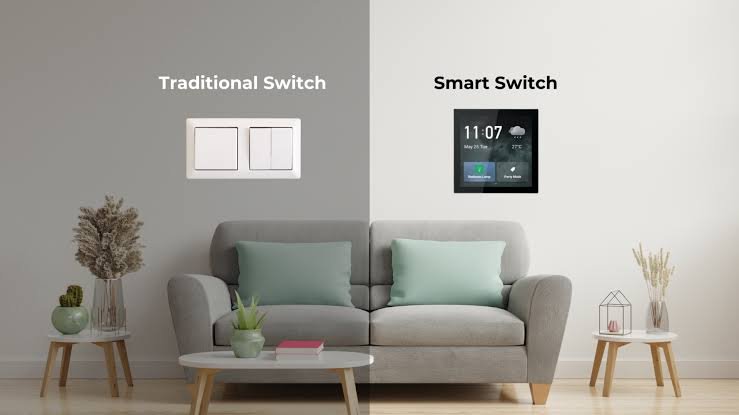
What Each Switch Does
A regular switch is a simple mechanical device that physically connects or breaks the circuit. Modular switches in India are commonly rated 6 A for lights and fans and 16 A for heavier loads like geysers and ACs. Quality switches carry the ISI mark under IS 3854, the standard for domestic switches.
A smart switch contains a small electronic controller and a wireless radio. It still switches the load on and off, but it can also be controlled through an app, voice assistant, schedule or sensor. Common types include:
- Wi-Fi touch panels with glass fronts that replace the entire switchboard
- Zigbee or Thread switches that connect through a hub and form a mesh network
- Bluetooth mesh switches, which work locally without Wi-Fi
- Smart push-button switches that look like regular modular switches but have smart controls inside
Where Smart Switches Earn Their Place
Smart switches are most useful in specific spots:
- Outdoor and gate lights: schedule them to turn on at sunset and off at a set time, even when you’re travelling.
- Water pump motors: set timers so the pump runs at fixed hours, as long as the smart switch or a connected contactor is rated for the motor’s starting load.
- Staircases and long corridors: control lights from multiple points without running extra two-way wiring, using virtual switches in the app.
- Elderly parents’ rooms: family members can check and switch off lights or appliances remotely.
- Bedrooms: switch off lights and fans from bed by voice or phone.
- Second homes and rented-out flats: check and control lights remotely to give an occupied look.
Where Regular Switches Still Win
Regular switches remain the better choice in many places:
- Bathrooms, where moisture and steam can affect electronics
- Store rooms, utility areas and lofts that are used briefly
- Kitchens where hands are often wet or oily
- Any room where you simply want instant, guaranteed control
Regular switches work during internet outages, need no app updates and are easy for guests, children and household staff to use.
Fans, LEDs and Compatibility
Smart switches don’t suit every appliance, and these details matter in Indian homes.
BLDC ceiling fans: Many energy-efficient BLDC fans come with their own remote or app control and shouldn’t be used with external fan regulators. Connect them through a plain on-off smart switch, or simply use their own controls, rather than a smart fan regulator.
Regular ceiling fans: Smart fan regulators work well with standard induction-motor fans and allow speed control from your phone.
LED lights and dimmers: Use smart dimmers only with LED bulbs or panels marked dimmable. Otherwise, lights may flicker or buzz.
Ghosting: Some smart switches installed without a neutral wire let a tiny current pass even when off, which can make low-wattage LED lights glow faintly. Choosing switches that use a neutral wire avoids this.
The Standby Power Nobody Mentions
Every smart switch stays powered all the time so it can receive commands. Each one draws a small amount of electricity, often around half a watt to a watt.
Consider a 2BHK where ten switchboards become smart:
- At 0.5 W each, that’s 5 W continuously, or about 44 units a year, roughly ₹300 at ₹7 per unit.
- At 1 W each, that’s 10 W continuously, or about 88 units a year, roughly ₹600.
It’s a modest amount, but it’s worth comparing with the savings smart scheduling actually delivers. Smart switches pay off best where they prevent lights, pumps or appliances from running unnecessarily.
Touch Panels vs Push Buttons
Glass touch panels look sleek and modern, and are easy to wipe clean. But they offer no physical click, so it’s harder to find the right switch in the dark or by feel. Many have small indicator lights to help. They can also show fingerprints and smudges.
Smart switches with physical push buttons feel more familiar, particularly for elderly family members, and still offer all the smart features. They’re a good middle path for homes that want automation without changing how switches feel.
Cost and Lifespan
Regular modular switches cost relatively little per point, and a whole home’s switches and plates fit a modest budget.
Smart switch panels cost considerably more per board, with prices varying by number of switches, brand, protocol and finish. A home-wide upgrade can be a significant investment, which is why many families start with a few rooms.
Mechanical switches are rated for very large numbers of on-off operations and often last a decade or more. Smart switches depend on electronics and may need replacement sooner, especially in areas with frequent voltage spikes. Surge protection helps them last longer.
Installation Checks
- Choose smart switches from reputable brands, with clear safety certifications.
- Check that the wall box is deep enough for the smart module.
- Confirm whether a neutral wire is available at the switchboard.
- Match each switch’s current rating to its load, especially pumps and geysers.
- Make sure Wi-Fi or the hub’s signal reaches every switch location.
- Keep firmware updated through the brand’s app.
A Practical Upgrade Plan
Most Indian homes get the best value with a gradual approach:
- Start with outdoor lights, the water pump and the bedroom, where convenience and savings are clearest.
- Add the living room for scenes and voice control.
- Keep bathrooms, utility areas and store rooms on regular switches.
- Choose smart switches that still work manually, so the home functions normally during internet outages.
FAQs
Q1. Are smart switches better than regular switches?
A: Smart switches add remote control and schedules, while regular switches are cheaper, simpler and work without internet.
Q2. Do smart switches use electricity when off?
A: Yes, they draw a small standby current, often around half a watt to a watt each.
Q3. Can smart switches work with BLDC fans?
A: BLDC fans should be used with their own remotes or a plain on-off switch, not an external regulator.
Q4. Why do LED lights glow faintly with smart switches?
A: Some smart switches without a neutral wire leak a small current, causing ghosting in LED lights.
Q5. Can a smart switch control a water pump?
A: Yes, if the switch or an added contactor is rated for the pump’s load.
Q6. Do smart switches work without Wi-Fi?
A: Many work manually, and some protocols like Zigbee or Bluetooth mesh offer local control without internet.