 By Saurav Mehra
 When people buy a Smart TV in India, they usually focus on screen size, picture quality, OTT apps, 4K resolution and sound output. But after bringing the TV home, one small port on the back panel creates confusion: HDMI ARC. Many users see “HDMI IN ARC” or “HDMI eARC” written near one HDMI port and wonder, “Is this different from normal HDMI? Should I connect my set-top box here? Is it only for soundbar? Why is my TV sound not coming through home theatre?”
This small port is actually very useful. In Indian homes, where TVs are connected with soundbars, home theatre systems, DTH boxes, gaming consoles, Fire TV Stick, Android boxes and Blu-ray players, cable management can become messy. Earlier, people used separate audio cables like optical, AUX or RCA along with HDMI. HDMI ARC makes the setup cleaner by allowing audio to travel from your TV back to a soundbar or AV receiver through the same HDMI cable.
In simple words, HDMI ARC helps your TV send sound to an external speaker system without needing an extra audio cable. If you want better sound for movies, cricket, OTT shows, music or gaming, understanding HDMI ARC can save money, reduce confusion and improve your home entertainment setup.
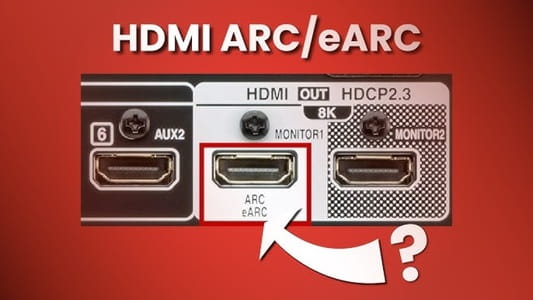
What Is HDMI ARC?
HDMI ARC stands for High-Definition Multimedia Interface Audio Return Channel. The important words are “Audio Return Channel.”
A normal HDMI port usually sends video and audio from a device to the TV. For example, a set-top box sends picture and sound to the TV through HDMI. But ARC allows the TV to send audio back to a soundbar or home theatre through the same HDMI cable.
This is useful when you are watching apps inside the TV, such as Netflix, YouTube, Prime Video, JioHotstar, SonyLIV or Zee5. The video plays on the TV, but the audio can go out to your soundbar through HDMI ARC.
Why HDMI ARC Is Useful
The biggest benefit of HDMI ARC is simple connection. You do not need a separate optical cable or AUX cable for TV audio. One HDMI cable can handle audio between the TV and soundbar.
It also makes the setup neater. Instead of multiple wires behind the TV cabinet, you can connect the soundbar to the ARC port and keep other HDMI ports for devices like DTH box, gaming console or streaming stick.
Another useful benefit is remote control convenience. In many setups, HDMI ARC works with HDMI CEC, which allows you to control soundbar volume using the TV remote. This means you may not need to keep switching between two remotes every time you adjust volume.
HDMI ARC vs Normal HDMI Port
A normal HDMI port receives audio and video from external devices. For example, when you connect a laptop, gaming console or set-top box to the TV, you can use a normal HDMI input.
The ARC port can also work like a normal HDMI input, but it has an extra audio return feature. That extra feature is what makes it special for soundbars and receivers.
If you connect a soundbar to a normal HDMI port without ARC support, the TV may not send sound to it properly. That is why you should always connect your soundbar to the HDMI port marked ARC or eARC.
Where to Find the HDMI ARC Port on Your TV
Look at the back or side panel of your TV. One HDMI port may be labelled as HDMI ARC, HDMI IN ARC, HDMI eARC, or HDMI ARC/eARC. On some TVs, only one port supports ARC. On others, one port may support eARC.
The label is usually printed near the HDMI port. If the TV is wall-mounted and the label is hard to see, check the user manual or the TV’s official specifications.
Do not assume every HDMI port supports ARC. In most TVs, only one specific HDMI port has ARC or eARC.
What Devices Use HDMI ARC?
HDMI ARC is mainly used with soundbars, AV receivers and home theatre systems. If you bought a soundbar from brands like Sony, Samsung, LG, JBL, boAt, Zebronics, Philips, Yamaha, Blaupunkt or Bose, it may have an HDMI ARC port.
Home theatre receivers also commonly support ARC. This allows the TV to send audio from its apps and connected devices to the receiver.
You do not usually need HDMI ARC for a set-top box, laptop or Fire TV Stick. These devices can connect to regular HDMI ports. The ARC port is most useful for the audio system.
How to Connect a Soundbar Using HDMI ARC
First, check the HDMI ARC port on your TV. Then check the HDMI ARC or HDMI OUT ARC port on your soundbar. Use a good HDMI cable and connect one end to the TV’s HDMI ARC port and the other end to the soundbar’s HDMI ARC port.
Turn on both devices. Open TV settings and go to Sound or Audio Output. Select HDMI ARC, Receiver, External Speaker or Soundbar as the sound output. Menu names vary by brand.
On some TVs, you also need to enable HDMI CEC. This may be called Anynet+ on Samsung, Simplink on LG, Bravia Sync on Sony, or CEC Control on other brands.
After setup, play any video from YouTube or an OTT app and check whether sound comes from the soundbar.
HDMI ARC and TV Apps
One of the best uses of ARC is TV app audio. Suppose you watch Netflix directly on your Smart TV. Without ARC, the TV may play sound through its built-in speakers unless you use optical or Bluetooth audio.
With HDMI ARC, the sound from Netflix, Prime Video, YouTube, JioHotstar and other TV apps can go directly to your soundbar. This gives better dialogue clarity, bass and overall sound experience.
For Indian families watching movies, cricket and web series, this can make a big difference compared to weak TV speakers.
HDMI ARC and Set-Top Box
If your DTH set-top box is connected to the TV through HDMI, the TV can pass the audio to the soundbar through ARC. This means your Tata Play, Airtel Digital TV, Dish TV, D2H or Jio set-top box audio can come from the soundbar.
In some setups, you can also connect the set-top box directly to the soundbar if the soundbar has HDMI input, and then connect the soundbar to TV. But for most users, connecting the set-top box to TV and soundbar to HDMI ARC is simpler.
HDMI ARC vs Optical Cable
Before ARC became common, many people used optical audio cables to connect TV and soundbar. Optical cables can still work well, but they have limitations.
HDMI ARC is usually more convenient because it can support remote volume control through HDMI CEC and may support better audio formats depending on devices. It also reduces cable clutter.
Optical is useful if your TV or soundbar does not support ARC, or if ARC is not working properly. But if both devices support HDMI ARC, using ARC is usually the cleaner choice.
What Is HDMI eARC?
HDMI eARC stands for Enhanced Audio Return Channel. It is an improved version of ARC. eARC can carry higher-quality audio formats and is more suitable for advanced setups, especially Dolby Atmos and high-bitrate audio from compatible content and devices.
If you have a premium TV, Dolby Atmos soundbar, AV receiver or high-end home theatre, eARC is better than regular ARC. It provides more bandwidth and better audio support.
But for basic soundbars and normal TV watching, regular ARC is often enough. You do not need to panic if your TV has ARC but not eARC.
Do You Need eARC or Is ARC Enough?
For most Indian users with a basic or mid-range soundbar, HDMI ARC is enough. It can send TV app sound, DTH audio and regular OTT audio to the soundbar easily.
You should look for eARC if you use a premium Dolby Atmos soundbar, gaming console, Blu-ray player, high-end receiver or want the best possible audio formats. eARC is also better for future-proofing if you are buying a premium TV.
If your main use is YouTube, DTH, serials, news and casual OTT, ARC is practical and sufficient.
Does HDMI ARC Support Dolby Atmos?
This depends on the TV, soundbar, app and audio format. Some TVs can send Dolby Atmos through ARC in compressed formats from streaming apps. But for higher-quality lossless audio formats, eARC is usually required.
If Dolby Atmos is important to you, check whether your TV and soundbar both support Atmos over ARC or eARC. Also check whether the app and content support Atmos.
Do not assume that the Dolby Atmos logo on a soundbar automatically means every TV app will play Atmos properly. The full chain must support it.
Which HDMI Cable Do You Need for ARC?
For regular HDMI ARC, most good-quality High-Speed HDMI cables should work. You do not usually need a very expensive cable.
For eARC and advanced gaming features, a better cable may be needed, especially if you are also using HDMI 2.1 features like 4K 120Hz from a gaming console.
Buy from a trusted brand and avoid very cheap, loose or damaged cables. If ARC is not working, trying another HDMI cable is one of the easiest troubleshooting steps.
Common HDMI ARC Problems
Sometimes users connect everything correctly but still get no sound. This can happen due to wrong TV audio output, disabled HDMI CEC, wrong HDMI port, poor cable, outdated software or incompatible settings.
First check that the soundbar is connected to the TV’s ARC/eARC port, not a normal HDMI port. Then check TV sound settings and select HDMI ARC as output. Enable CEC if required. Restart both TV and soundbar.
Also check the soundbar input mode. It may need to be set to HDMI ARC, TV ARC or D.IN depending on brand.
Why Volume Control Is Not Working
If sound comes from the soundbar but the TV remote cannot control volume, HDMI CEC may be off. Turn on CEC in TV settings and soundbar settings if available.
Different brands use different names for CEC. Samsung calls it Anynet+, LG calls it Simplink, Sony calls it Bravia Sync, and other brands may simply call it HDMI CEC.
After enabling CEC, restart both devices. In many cases, the TV remote will then control soundbar volume.
Why Sound Is Delayed
Audio delay or lip-sync issue can happen when sound does not match the video. This is common in some soundbar and TV combinations.
Check TV sound settings for audio delay, digital audio delay, AV sync or lip sync adjustment. Adjust slowly until dialogue matches lips.
If delay happens only in one app, update or reinstall that app. If delay happens with one external device, check that device’s audio settings too.
Can HDMI ARC Turn On the Soundbar Automatically?
Yes, in many setups, HDMI ARC with CEC can turn on the soundbar automatically when the TV turns on. It can also switch audio output automatically and control volume.
This is very convenient for families because anyone can use the TV without understanding multiple remotes. However, automatic control depends on brand compatibility and settings.
If it does not work, check CEC settings on both TV and soundbar.
Should You Connect Gaming Console to ARC Port?
If your TV has multiple HDMI ports and only one ARC/eARC port, reserve ARC/eARC for the soundbar. Connect your PlayStation, Xbox or gaming PC to another HDMI port that supports the required gaming features.
However, some TVs have limited HDMI 2.1 ports, and the eARC port may also be one of the high-performance ports. In that case, planning becomes important. Check your TV manual to decide the best port for soundbar and console.
For gamers, eARC can be useful because it sends high-quality audio from console-connected TV to the soundbar.
What If Your TV Does Not Have HDMI ARC?
If your TV does not have ARC, you can still connect a soundbar using optical cable, AUX cable, RCA cable or Bluetooth, depending on available ports.
Optical is usually the best alternative for clean digital sound. AUX and RCA are older methods and may not offer the same quality. Bluetooth is wireless but can sometimes have audio delay.
If you are buying a new soundbar, check your TV ports first so you do not buy a model that is difficult to connect.
Best Setup for Indian Homes
For a simple living-room setup, connect your soundbar to the TV’s HDMI ARC port. Connect DTH box, Fire TV Stick and gaming console to other HDMI ports. Enable HDMI CEC. Set TV sound output to HDMI ARC. Keep the soundbar in front of the TV and adjust audio mode according to content.
For movies, use cinema or surround mode. For news and serials, use clear voice or dialogue mode. For cricket, use standard or sports mode if available.
This setup gives better sound without making the TV cabinet messy.
FAQs
Q1. What is HDMI ARC used for on a TV?
HDMI ARC is used to send audio from your TV to a soundbar, home theatre or AV receiver through one HDMI cable. It is especially useful for TV apps, DTH audio and connected devices.
Q2. Is HDMI ARC better than optical cable?
HDMI ARC is usually more convenient because it can carry audio and allow TV remote volume control through HDMI CEC. Optical cable is still useful if your TV or soundbar does not support ARC.
Q3. Can I use any HDMI cable for ARC?
Most good-quality High-Speed HDMI cables work for regular ARC. For eARC or advanced audio/video setups, use a better-quality cable from a trusted brand.
Q4. Why is my HDMI ARC soundbar not working?
Check whether the soundbar is connected to the TV’s HDMI ARC/eARC port, not a normal HDMI port. Then select HDMI ARC in TV sound settings, enable HDMI CEC and restart both TV and soundbar.